AI
AI built around how reviewers read a case.
Open the file. Sort the documents. Search the pages. Find the evidence. Draft the decision. Adjudicate’s AI shows up where the work already is — running in the background to prepare the file before you open it, then as tools at hand while you read and write. Every output points to a specific page in the record.
Before you open the case
AI prepares the file.
A case file arrives as a PDF — hundreds of documents, no order, no labels. AI gets it ready before a reviewer ever opens it.
Reads every page.
OCR with layout detection turns the PDF into searchable, structured text — paragraphs, tables, signature blocks.
Labels every document.
Each document is typed: C&P exam, rating decision, notice of disagreement, Form 9, lay statement, private medical record.
Pulls receipt dates.
The date each document was received is extracted from the cover page or form fields, so the file opens sorted by date.
Catches duplicates at intake.
The same matter often arrives by portal, fax, and mail. AI flags the duplicate as it lands and queues a merge for review.
While you're reading
AI works alongside you in the Reader.
Open the file. Search it. Ask it questions. AI works with the reviewer — not around them.
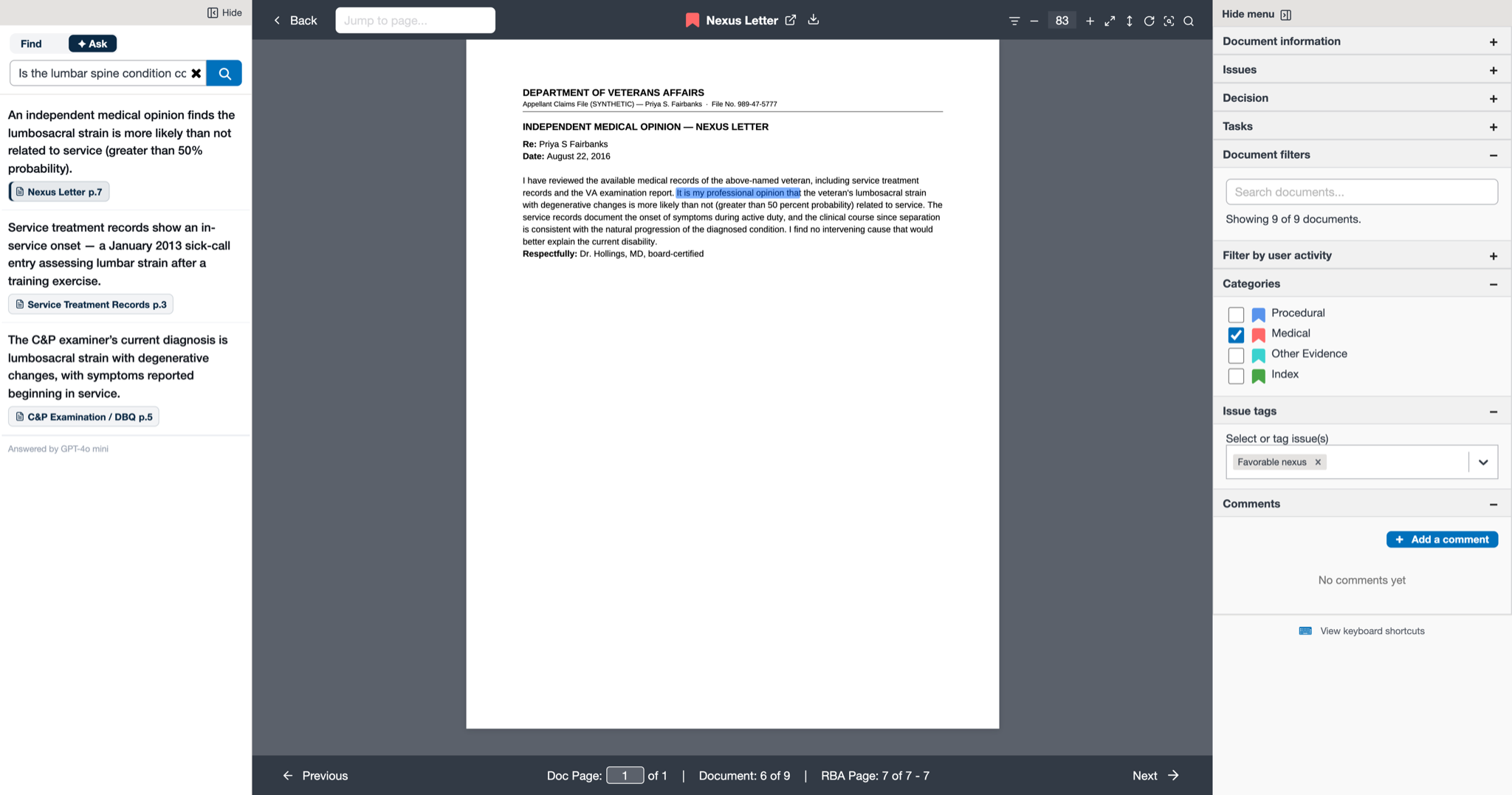
Shown on a fully synthetic claims file — no real veteran data.
Search by relevance, not just keyword.
Type “tinnitus” and the results are ranked by relevance to the appeal — pages where it’s the subject of an exam, not pages where it’s incidentally mentioned.
Open the right pages first.
Click an issue in the sidebar; the Reader scrolls to the pages most relevant to that issue — useful when a 200-page exam is on file.
Ask a question. Get an answer with citations.
A chat panel in the Reader: “What did the C&P examiner conclude about range of motion?” The answer streams back with links to the exact pages.
Cross-references become page links.
When a document cites a prior decision or another exam, the reference is recognized and linked to the cited page in the record.
While you're drafting
AI drafts and verifies.
In Authoring, the reviewer writes the decision. AI handles the boilerplate, optional first-pass drafts, and the citation checks.
Standard sections fill in.
For each issue, the standard opening, analysis, and conclusion blocks pull from the boilerplate library. The reviewer revises in place.
Optional first-pass draft.
Ask for a draft of a section, built from the issue and its evidence. The draft is a starting point — the reviewer edits it like any other text.
Every citation verified.
Every page reference in the draft is checked against the record. Bad citations surface before the decision goes out.
Two patterns. One platform.
Most of the AI above is tools the reviewer drives — search, page jumps, the chat panel, citation check. The reviewer asks; AI answers. A smaller set runsin the background — issue extraction at intake, duplicate-catching, document labeling — and waits for a reviewer to accept it before it takes effect.
How we keep people in control
Four rules the AI works within.
Adjudicate proposes; you decide; the record keeps every step. The reviewer is accountable for every decision — these four rules are built into the platform, not optional, and make that accountability real.
The AI never acts alone.
When AI does background work, the result waits for a reviewer to accept it. A rejection is recorded so the reasoning is kept either way.
Every output points to a page.
An answer to a question, a suggested issue, a draft citation — each one links to the specific page it was drawn from. A reviewer checks it in one click.
Every step is in the audit log.
The model that produced an output, the confidence, the timestamp, and what the reviewer did with it — all on the case’s audit trail, the same as a human edit.
One case at a time.
The AI can’t reach across cases. A query about one appeal can’t see another appeal’s record — the same separation a human reviewer works with.
Your data, your model, your environment.
Which model does the reading is configuration. A deployment with strict data-handling rules runs the AI on a self-hosted model inside its own environment — VA GovCloud, an on-premises cluster, a classified enclave. Another points it at a managed model. The case never leaves the deployment’s boundary to be read.
AI accelerates expertise. It doesn’t replace it.
The reviewer is still the one who weighs the evidence and signs the decision. What the AI removes is the overhead around that judgment — the reading, sorting, finding, and first-pass drafting. The case is the work; AI handles what stands between the reviewer and it.
See it on a real case file.
A working product, on a fully synthetic case. Ask for a walkthrough.
Request a demo